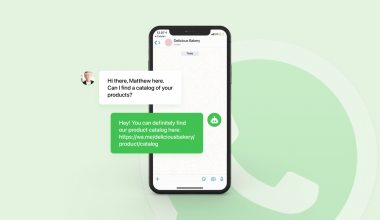
Adding a chatbot for WhatsApp Business closes the gap between incoming message volume and team capacity. And for Malaysian businesses, that gap is growing.
WhatsApp handles over 13 million users in Malaysia. And for most businesses here, it is the primary channel customers use to ask questions, place orders, and request support. But without automation, every message requires a human. And humans run out of capacity well before the messages do.
This guide explains how WhatsApp chatbots work and where the native app falls short. And it shows how the WhatsApp Business API unlocks real AI capability through Qiscus AgentLabs.
What Is a Chatbot for WhatsApp Business?
A chatbot for WhatsApp Business is an automated system that engages customers in structured, context-aware conversations on WhatsApp. It identifies customer intent. It routes conversations based on what the customer needs. And it escalates to a human agent when the issue requires it.
The key distinction is intelligence. A static greeting message fires when someone messages you for the first time. A WhatsApp chatbot reads the message, understands the intent, and responds from a knowledge base trained on your business. One is a one-way notification. The other is a two-way conversation.
And based on existing research, AI customer service tools reduce agent handling time on repetitive queries by a measurable margin while maintaining or improving customer satisfaction. The businesses that deploy them handle more volume with the same team. And the businesses that do not fall further behind on response time every quarter.
Why Malaysian Businesses Need WhatsApp Chatbots Now
The case for WhatsApp chatbots in Malaysia is not theoretical. It is built on three converging realities about how Malaysian customers communicate and what they expect.
1. WhatsApp Is the Primary Business Communication Channel in Malaysia
Based on existing research, WhatsApp has an 82% penetration rate in Malaysia. And based on existing research, 7 in 10 Malaysian consumers prefer messaging a business over calling or emailing. WhatsApp is not an optional channel. It is the channel. And the volume of messages it generates grows with every new customer your business acquires.
Based on existing research, FAQ-type queries make up 60 to 70% of all incoming WhatsApp messages. And a chatbot that handles them frees your team for interactions that require judgment.
2. Instant Response Is Now the Baseline Expectation
Based on existing research, 90% of customers consider an immediate response important when contacting a business. And in Malaysia, that expectation does not pause outside business hours. A business that responds fast during office hours but goes silent at 7pm delivers an inconsistent experience. And inconsistent experiences drive churn.
A WhatsApp chatbot operates 24 hours a day. No quality degradation. No overtime. It responds in seconds and handles multiple conversations simultaneously. And it never misses a message because the team is unavailable.
3. Multilingual Communication Is a Structural Requirement
Malaysian customers communicate in Bahasa Malaysia, English, and Mandarin. And they often switch languages mid-conversation. A multilingual WhatsApp chatbot responds accurately in all three without requiring dedicated agents for each. And it delivers consistent quality in whichever language the customer uses.
These three realities make WhatsApp chatbot deployment an operational necessity for most Malaysian businesses. But achieving it requires distinguishing between the free app and the API.
What the WhatsApp Business App Cannot Do
The free WhatsApp Business App includes automated message features. But they are static text responses with fixed triggers. And each one has hard ceilings that most growing businesses hit quickly.
1. Greeting Messages Are Static, Not Intelligent
A greeting message is sent automatically when a customer first messages you or returns after 14 days. It is identical for every customer. It cannot adapt based on what the customer wrote. And it cannot ask a follow-up question, present options, or route the customer anywhere based on their input.
2. Away Messages Inform
Away messages notify customers that the team is unavailable. But they cannot collect structured information from the customer while the team is offline. They cannot qualify a lead, book an appointment, or route an urgent request to an on-call agent. They are a notification, not a workflow.
3. Quick Replies Require Human Selection
Quick replies let agents retrieve pre-saved responses using a shortcut. They reduce typing time. But a human agent still selects and sends each one. The app limits businesses to 50 saved replies. And the selection itself adds latency that a true AI response eliminates entirely.
4. The Structural Boundary
The WhatsApp Business App cannot run conditional conversation flows. It cannot interpret free-form customer messages and respond based on intent. It cannot qualify leads through a guided dialogue. It cannot route conversations to specific teams. And it cannot hand off to a human agent with conversation history attached.
These are not missing features that will arrive in a future update. They are structural limits of the free app. And real chatbot capability requires the WhatsApp Business API.
How WhatsApp Business API Enables Real AI Chatbot Capability
The WhatsApp Business API opens the programmable layer beneath WhatsApp’s messaging infrastructure. And that is the layer where AI chatbot capability operates.
API access requires an official WhatsApp Business Solution Provider (BSP). The BSP manages the technical integration, Meta compliance requirements, and message template approval. And through the BSP’s platform, businesses deploy AI chatbots that operate across the API’s full feature set.
1. Intent Recognition and AI-Powered Responses
Through LLM integration, API-connected AI chatbots interpret free-form customer messages without requiring exact keyword matches. They identify what the customer needs, match it to the right flow, and reply from a trained knowledge base.
A rule-based chatbot breaks when a customer phrases a question unexpectedly. An AI agent understands context and responds accordingly. Based on existing research, AI agents reason through intent rather than matching keywords. And that is what makes them a fundamental shift from traditional chatbots.
2. Conditional Conversation Flows
The API supports multi-step flows that branch based on what the customer types or selects. A customer asking about booking triggers a different flow than one asking about delivery status. Each flow collects the needed information and confirms it back to the customer. Then it completes the action or routes to the right agent.
3. CRM and System Integration
The API connects to external CRM systems, databases, and business tools via webhook. A WhatsApp chatbot can look up order status, check availability, and push lead data to your CRM. All within the conversation and without agent involvement.
4. Structured Handover to Human Agents
When a conversation meets an escalation trigger, the API transfers it to a human agent in the connected platform. The agent receives the full conversation history, customer profile data, and detected intent. Agents step in already informed. And customers do not repeat themselves.
These four capabilities define what a genuine WhatsApp AI chatbot delivers. And they are only available through the API.
Key Chatbot Features for WhatsApp Business
With the API as the infrastructure, here are the specific chatbot features that deliver the most operational value for Malaysian businesses.
1. Auto-Reply and 24-Hour Availability
AI-powered auto-reply identifies what the customer is asking and responds instantly from a trained knowledge base. Based on existing research, 80% of routine WhatsApp queries fall into categories that auto-reply fully resolves. And it does this around the clock, including the hours when your team is unavailable.
For businesses in Malaysia where customer messages arrive at all hours, 24-hour AI auto-reply directly reduces missed inquiry volume. And CSAT on first contact improves immediately because customers receive a real answer rather than a promise that someone will reply tomorrow.
2. FAQ Bot
An FAQ bot handles the high-volume, repetitive queries that consume most agent time. Operating hours, pricing, return policies, and appointment information all belong in a well-configured FAQ bot.
Based on existing research, FAQ-type queries represent 60 to 70% of all incoming messages for a typical Malaysian business. Automating that volume frees agents for conversations requiring judgment, empathy, or authority. Those are the interactions where human agents make the most difference.
3. Lead Qualification Bot
A lead qualification bot runs a structured conversation that collects what a sales team needs before first contact. Name, budget, timeline, and contact preference are all gathered through a guided flow. No agent involved.
Sales teams receive qualified, structured lead data. Not raw inbound messages that need manual follow-up. And it happens automatically, even outside business hours.
4. Booking and Appointment Bot
Booking flows guide a customer through selecting a service, choosing a slot, and confirming their details. All without agent involvement. And by connecting to a calendar via API, the chatbot checks real availability before confirming.
This is particularly valuable in healthcare, beauty, education, and hospitality. Appointment booking drives a significant share of WhatsApp inbound volume in all four.
5. Human Agent Handover
The most important feature of any WhatsApp chatbot is the quality of its handover to a human agent. A handover that drops context undoes the efficiency gains the chatbot created.
Effective handover transfers the full conversation history, identified intent, and any collected data to the assigned agent. The agent sees everything before they type a word. And the customer does not have to re-explain their situation.
Strategies for Deploying a WhatsApp Chatbot Effectively
A WhatsApp chatbot is both a configuration project and a process design project. And businesses that address both before going live see the most value.
1. Map Your Inbound Query Mix
Before building any flow, pull your last 90 days of inbound messages and categorise them. Which query types appear most often? Which are fully answerable with information you already have? And which require agent judgment or live data access?
That categorisation defines which flows to build first and what the FAQ bot needs to cover. And it shows where to route to a human agent rather than attempt a response.
2. Design Escalation Triggers
Define the exact conditions that trigger a human handover, before the bot goes live. These include unresolvable queries, frustration signals, customer tier flags, and compliance-sensitive request types.
Build those triggers into the configuration. And test every escalation path before customer-facing activation.
3. Build the Knowledge Base
An AI chatbot is only as accurate as what it trains on. Build and structure your knowledge base before training begins. Cover product information, policies, and escalation procedures. Gaps in the knowledge base produce inaccurate responses. Inaccurate responses damage customer trust more than no response.
4. Monitor Weekly for the First 60 Days
Review resolution rate, escalation frequency, and CSAT weekly for the first 60 days. Use the analytics dashboard to identify which intents resolve correctly and which need retraining. And update the knowledge base whenever product information or policies change.
5. Train the AI on Real Conversation Data
The fastest way to improve a WhatsApp AI chatbot after launch is real customer conversations. Actual customer phrasing, actual question variations, and actual escalation patterns train the AI faster than documentation alone. Configure a review cycle where new intents from live conversations feed back into training.
How Qiscus AgentLabs Powers WhatsApp Chatbots in Malaysia
Qiscus is an agentic customer engagement platform and an official WhatsApp Business Solution Provider. Qiscus AgentLabs is the LLM-powered AI Agent platform that deploys WhatsApp chatbots capable of reasoning through complex customer inquiries, not just matching keywords.
Here is what AgentLabs delivers for WhatsApp chatbot deployment in Malaysia.
1. LLM-Powered Intent Recognition Across All Channels
AgentLabs uses LLM technology to interpret free-form customer messages with contextual understanding. It identifies intent accurately across Bahasa Malaysia, English, and Mandarin without exact keyword matches. And it generates responses from a knowledge base trained on your business.
So customers receive accurate, on-brand answers from the first message. And the chatbot improves with every conversation, as the AI continuously learns from new interaction patterns.
2. WhatsApp Business API Integration
Through Qiscus WhatsApp Business API, AgentLabs connects to WhatsApp with full API depth. WhatsApp conversations generate structured conversation contexts. And messages route to the AI agent or human agent based on configured intent rules. The AI handles tier-one volume around the clock. Complex cases escalate to agents with full context intact.
3. Seamless Human Handover Within Qiscus Omnichannel Chat
When AgentLabs escalates a conversation, it routes to the agent via Qiscus Omnichannel Chat with the complete conversation history, detected intent, and customer profile attached. Agents see everything before they type a word. No context gap. No customer repetition.
And Qiscus Omnichannel Chat consolidates WhatsApp alongside 20+ other channels. So the same AI and human infrastructure handles every channel simultaneously.
4. Real-World Results
Based on existing research and AI agent implementation data across Southeast Asian markets, businesses that deploy AI agents for WhatsApp handling see measurable improvements in first response time, escalation rates, and CSAT on bot-handled conversations. PCS Indonesia reduced repetitive agent workload by 30% after deploying Qiscus AI alongside their service team. And that workload reduction directly reflected as faster response times and higher agent capacity for complex interactions.
How to Get Started with a WhatsApp Chatbot Through Qiscus
The deployment path for a WhatsApp AI chatbot through Qiscus follows five steps. Each one builds on the previous. And skipping any one creates configuration problems that are harder to fix after the chatbot is live.
1. Connect Your Phone Number to WhatsApp Business API
The first step is connecting your phone number to the WhatsApp Business API through Qiscus. This requires a verified Facebook Business Manager account, a dedicated phone number, and initial approved message templates. Qiscus manages Meta verification and template submission as part of onboarding.
2. Define Your Chatbot Scope Before Building
Before activating AgentLabs, document the query types to handle, the flows for each, the data to collect, and the escalation triggers. This becomes the AI training specification. Teams that complete it before configuration deploy faster and need fewer post-launch corrections.
3. Train AgentLabs on Your Business Knowledge Base
Upload product information, service policies, and process documentation to the AgentLabs knowledge base. The AI trains on this material to generate accurate, contextually relevant responses. Structured, complete documentation at this stage determines chatbot accuracy from day one.
4. Test Every Flow and Escalation Path Before Go-Live
Run every scenario through AgentLabs’ test environment before going live. Test FAQ handling for accuracy. Test lead qualification flows for completeness. And test every escalation path to confirm full context transfers to the receiving agent.
5. Monitor Weekly for the First 60 Days
After launch, review resolution rate, escalation frequency, and CSAT weekly. Use the AgentLabs analytics dashboard to identify which intents are resolving correctly and which need retraining. And update the knowledge base whenever product information or policies change.
Start to Build your Chatbot WhatsApp AI with Qiscus
A WhatsApp AI chatbot does not eliminate the need for human agents. It handles the volume that does not require them. And it gives your team time for the conversations where judgment, empathy, and authority make the difference.
Qiscus is an agentic customer engagement platform. It connects WhatsApp Business API, AgentLabs AI chatbot capability, and a unified omnichannel inbox in one system. Malaysian businesses deploy WhatsApp AI chatbots through Qiscus without developer involvement. And they go live in weeks.
See how Qiscus AgentLabs works for your business and start answering every WhatsApp message your customers send.
Frequently Asked Questions About WhatsApp Business Chatbots
Yes. The free WhatsApp Business App only supports static greeting and away messages. Real chatbot capability, including AI intent recognition, conditional flows, lead qualification, and structured human handover, requires the WhatsApp Business API accessed through an official BSP like Qiscus.
A traditional chatbot follows a fixed script and breaks when a customer phrases a question outside the pre-defined pattern. An AI agent interprets free-form messages, understands context and intent, and generates accurate responses from a trained knowledge base. Context is what changes everything. Based on existing research, the evolution from rule-based chatbots to AI agents represents a fundamental shift in how automated conversations operate on WhatsApp and other channels.
Yes. Qiscus AgentLabs supports multilingual responses. The AI detects the language a customer uses and responds in the same language from your trained knowledge base. No separate chatbot deployments or separate phone numbers are required for each language.
For a basic FAQ bot with three to five intents and standard escalation rules, two to four weeks from API activation to go-live is realistic. For a more comprehensive deployment covering lead qualification, booking automation, and CRM integration, four to eight weeks is more accurate. The timeline is driven primarily by knowledge base preparation, not technical setup.
When a conversation meets an escalation trigger, AgentLabs transfers it to a human agent in Qiscus Omnichannel Chat. The agent receives the full conversation history, the customer’s profile, and the detected intent. So they step in already informed. And the customer does not repeat their situation.