Over the month, we have been developing Buddy Chat for Android with custom features chatroom. Based on our experience, Qiscus SDK supports to develop sending payload messages. You can make your custom payload based on which of your data to include in your custom bubble chat room. For example, user interface of bubble survey in LINE Chat Application.
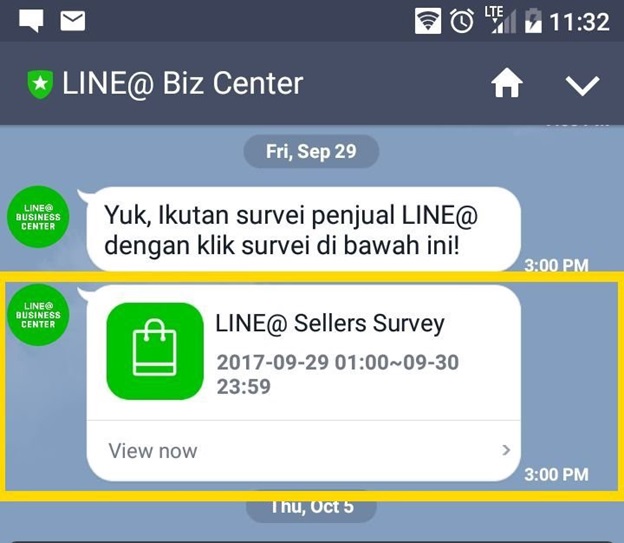
First, we have to analyze widgets requirement from the picture to implement in file item_message.xml. Furthermore, you can use ConstraintLayout to build responsive UI. However, other people say build with relative layout is better.
1. Custom Bubble Item
This is example using relative layout:
<?xml version="1.0" encoding="utf-8"?>l
<RelativeLayout
    xmlns:android="http://schemas.android.com/apk/res/android"
    android:layout_width="match_parent"
    android:layout_height="wrap_content">

    <TextView
        android:id="@+id/date"
        android:layout_width="wrap_content"
        android:layout_height="wrap_content"
        android:layout_centerHorizontal="true"
        android:layout_marginBottom="8dp"
        android:layout_marginTop="4dp"
        android:textColor="@color/qiscus_secondary_text"
        android:textSize="14sp"
        android:visibility="gone"/>

    <com.qiscus.sdk.ui.view.QiscusCircularImageView
        android:id="@+id/avatar"
        android:layout_width="38dp"
        android:layout_height="38dp"
        android:layout_alignTop="@+id/message"
        android:layout_marginLeft="8dp"
        android:layout_marginStart="8dp"/>

    <TextView
        android:id="@+id/name"
        android:layout_width="wrap_content"
        android:layout_height="wrap_content"
        android:layout_alignEnd="@+id/message"
        android:layout_alignLeft="@+id/bubble"
        android:layout_alignRight="@+id/message"
        android:layout_alignStart="@+id/bubble"
        android:layout_below="@+id/date"
        android:layout_marginEnd="4dp"
        android:layout_marginLeft="4dp"
        android:layout_marginRight="4dp"
        android:layout_marginStart="4dp"
        android:layout_marginTop="4dp"
        android:ellipsize="end"
        android:maxLines="1"
        android:textColor="@color/qiscus_secondary_text"
        android:textSize="12sp"
        android:visibility="gone"/>

    <ImageView
        android:id="@+id/bubble"
        android:layout_width="42dp"
        android:layout_height="27dp"
        android:layout_alignTop="@+id/message"
        android:layout_marginLeft="42dp"
        android:layout_marginStart="42dp"
        android:src="@drawable/ic_qiscus_arrow_bubble_primary"
        android:tint="@color/qiscus_left_bubble"/>

    <LinearLayout
        android:id="@+id/message"
        android:layout_width="236dp"
        android:layout_height="wrap_content"
        android:layout_below="@+id/name"
        android:layout_marginBottom="4dp"
        android:layout_marginLeft="54dp"
        android:layout_marginRight="32dp"
        android:layout_marginStart="54dp"
        android:background="@drawable/qiscus_rounded_primary_chat_bg"
        android:orientation="vertical">

        <RelativeLayout
            android:layout_width="match_parent"
            android:layout_height="wrap_content">

            <RelativeLayout
                android:id="@+id/image"
                android:layout_width="48dp"
                android:layout_height="48dp"
                android:layout_centerVertical="true"
                android:layout_margin="10dp"
                android:background="@drawable/qiscus_rounded_dark_white">

                <ImageView
                    android:id="@+id/ic_image"
                    android:layout_width="48dp"
                    android:layout_height="48dp"
                    android:layout_centerInParent="true"
                    android:layout_centerVertical="true"
                    android:layout_marginEnd="8dp"
                    android:layout_marginRight="8dp"
                    android:padding="8dp"
                    android:tint="@color/qiscus_divider"/>
            </RelativeLayout>

            <TextView
                android:id="@+id/name_survey"
                android:layout_width="match_parent"
                android:layout_height="wrap_content"
                android:layout_marginLeft="8dp"
                android:layout_marginRight="8dp"
                android:layout_marginTop="13dp"
                android:layout_toRightOf="@+id/image"
                android:autoLink="web"
                android:linksClickable="true"
                android:text="LINE @ Selles Survey"
                android:textColor="@color/qiscus_primary_text"
                android:textColorLink="@color/qiscus_primary_text"
                android:textSize="16sp"
                android:textStyle="bold"/>

            <TextView
                android:id="@+id/date_survey"
                android:layout_width="match_parent"
                android:layout_height="wrap_content"
                android:layout_below="@+id/name_survey"
                android:layout_marginLeft="8dp"
                android:layout_marginRight="8dp"
                android:layout_marginTop="8dp"
                android:layout_toRightOf="@+id/image"
                android:autoLink="web"
                android:linksClickable="true"
                android:text="2017-09-29"
                android:textColor="@color/qiscus_secondary_text"
                android:textColorLink="@color/qiscus_primary_text"
                android:textSize="14sp"/>
        </RelativeLayout>

        <RelativeLayout
            android:layout_width="match_parent"
            android:layout_height="wrap_content">

            <View
                android:id="@+id/line"
                android:layout_width="match_parent"
                android:layout_height="0.5dp"
                android:background="@color/qiscus_white"/>

            <TextView
                android:id="@+id/view_now"
                android:layout_width="wrap_content"
                android:layout_height="wrap_content"
                android:layout_below="@+id/line"
                android:layout_marginLeft="8dp"
                android:layout_marginRight="8dp"
                android:layout_marginTop="8dp"
                android:autoLink="web"
                android:linksClickable="true"
                android:paddingBottom="10dp"
                android:text="View Now"
                android:textColor="@color/qiscus_secondary_text"
                android:textColorLink="@color/qiscus_primary_text"
                android:textSize="14sp"/>

        </RelativeLayout>

    </LinearLayout>

    <TextView
        android:layout_marginTop="100dp"
        android:id="@+id/time"
        android:layout_width="wrap_content"
        android:layout_height="wrap_content"
        android:layout_marginLeft="8dp"
        android:layout_marginStart="8dp"
        android:text="12.36 AM"
        android:layout_toRightOf="@+id/message"
        android:textColor="@color/qiscus_secondary_text"
        android:textSize="12sp"/>
    <!-- Add this view because Xiaomi need it -->
    <View
        android:layout_width="match_parent"
        android:layout_height="0dp"
        android:layout_below="@+id/message"/>
</RelativeLayout>
https://gist.github.com/fauzisho/43178d6c6327d4139f6ce60b79d74693#file-item_messege_survey-xml
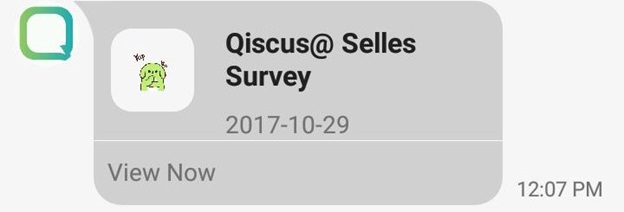
This is illustrated of this layout:
2. Chat Room Architecture Components
Second, we make Activity, Fragment, Adapter, and ViewHolder classes extend with class including in Qiscus SDK. After we extend Qiscus base to our custom classes, we can override methods in Qiscus Base.
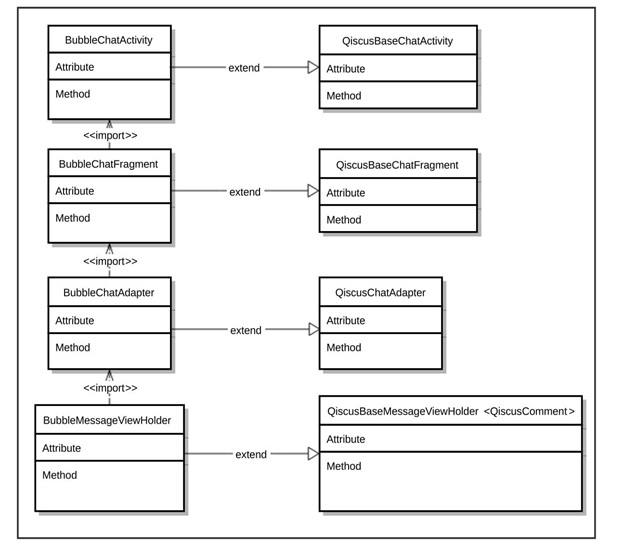
For instance, in BubbleChatActivity.java we can override getResourceLayout() to implement custom main layout. You can add new toolbar with cool widgets like CircleImageView, Textview for name and new status, new feature include in Chatroom Activity.
@Override
protected int getResourceLayout() {
    return R.layout.activity_sticker_chat;
}
Next, in BubbleChatFragment.java we can custom bottom bar, not only edittext message, but also the size of list chat, new feature import image from the gallery until custom payload like sendSurvey() method.
    private void sendSurvey() {
        String message = "Survey Qiscus";
        JSONObject payload = new JSONObject();
        try {
            payload.put("sticker_url", "https://res.cloudinary.com/qiscus/image/upload/fxwzBRPcdz/Bubble-Pup-Yup.gif");
            payload.put("profile_url", "http://res.cloudinary.com/diufvqwbr/image/upload/v1507608923/logo_gb4lzy.png");
            payload.put("title_survey", "Qiscus@ Selles Survey");
            payload.put("date", "2017-10-29");
            payload.put("link_url", "https://www.qiscus.com/");
        } catch (JSONException e) {
            e.printStackTrace();
        }
        QiscusComment comment = QiscusComment.generateCustomMessage(message, "survey", payload,
                qiscusChatRoom.getId(), qiscusChatRoom.getLastTopicId());
        sendQiscusComment(comment);
    }
Next, we can analyze this method, we found a payload (JSONObject) initialization with dummy data object. Before sending to sendQiscusComment () method, we have to generate custom message with the parameter provided in QiscusComment.generateCustomMessage().
In adapter class, we have three methods to set an item bubble chat. We can set different layout form others with getIntemResourceLayout(), including set widgets item in QiscusBaseMessegeViewHolder().
    @Override
    protected int getItemViewTypeCustomMessage(QiscusComment qiscusComment, int position) {
        try {
            JSONObject payload = new JSONObject(qiscusComment.getExtraPayload());
            if (payload.optString("type").equals("survey")) {
                return qiscusComment.getSenderEmail().equals(qiscusAccount.getEmail()) ? TYPE_SURVEY : TYPE_SURVEY_OTHERS;
            }
        } catch (JSONException ignored) {

        }
        return super.getItemViewTypeCustomMessage(qiscusComment, position);
    }

    @Override
    protected int getItemResourceLayout(int viewType) {
        switch (viewType) {
            case TYPE_SURVEY:
                return R.layout.item_message_survey;
            case TYPE_SURVEY_OTHERS:
                return R.layout.item_message_survey;
            default:
                return super.getItemResourceLayout(viewType);
        }
    }

    @Override
    public QiscusBaseMessageViewHolder<QiscusComment> onCreateViewHolder(ViewGroup parent, int viewType) {
        switch (viewType) {
            case TYPE_SURVEY:
            case TYPE_SURVEY_OTHERS:
                return new BubbleMessageViewHolder(getView(parent, viewType), itemClickListener, longItemClickListener,context);
            default:
                return super.onCreateViewHolder(parent, viewType);
        }
    }
Look here:
https://gist.github.com/fauzisho/4fd7e7cbaa34fa7cfeb21289e2b63974#file-adapter_method-java
Also read: Qiscus Web SDK Version 2.6.0 is Now Live. Here’s What’s New!
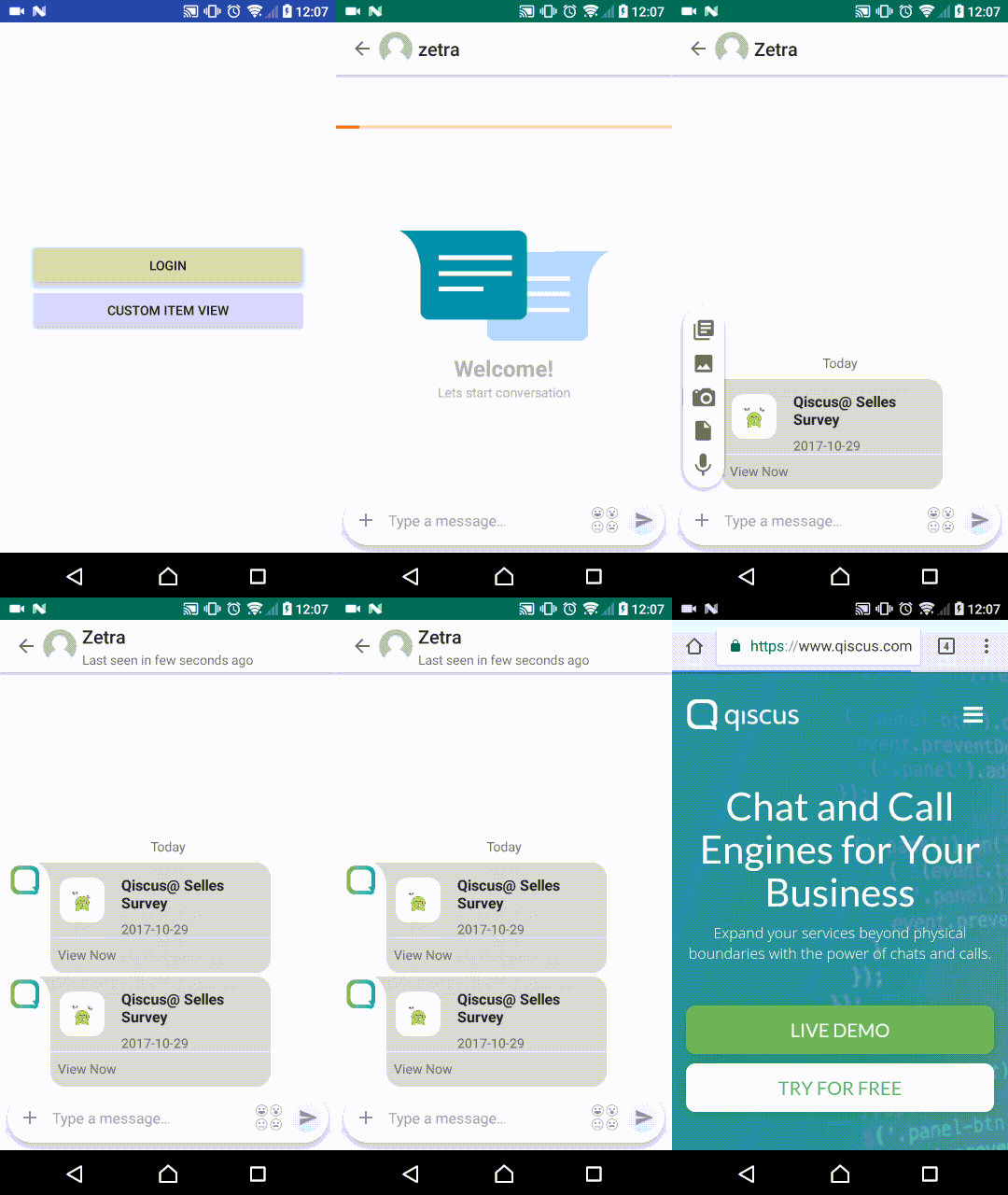
Run, run, run!
Repository
Here you have the code that we developed in this part:
https://github.com/fauzisho/Bubble-Chat
Conclusion
As you can see, it’s really easy to custom UI bubble chat with Qiscus SDK.
If you find something to improve or any suggestion, don’t hesitate to contact us, we will try to do our best to answer any question or improve this tutorial.